Finding the Architecture of an Executable
When modding with graphics injections, accurately identifying the architecture of a game's executable is important. Knowing whether the executable is 32-bit or 64-bit ensures compatibility and proper operation of tools such as ReShade and other graphics modifications. This guide shows you how to determine the architecture of a running game executable using Task Manager.
Start the Game
Start the game as usual, then press Alt + Tab to return to the desktop while the game continues running in the background.
Open Task Manager
Press Ctrl + Shift + Esc to open Task Manager, or right-click the taskbar and select Task Manager from the context menu.
Locate the Game Process
In Task Manager, select the Processes tab and locate the game's process. The process name typically matches the game application's executable name.
Identify the Architecture
-
32-bit architecture: If the game is running in 32-bit mode, the process name includes a
(32 bit)or(32 Bits)tag.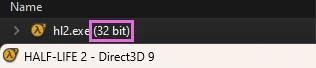
-
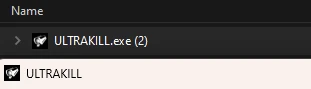
64-bit architecture: If no such 32-bit tag is shown next to the process name, the game is running as a 64-bit process.